 Process Explorer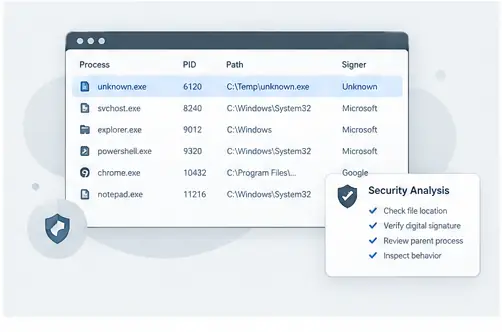
Use evidence, not names
A process with an unfamiliar name is not automatically malicious, and a familiar name is not automatically trustworthy. During a security investigation, combine several signals: executable path, process relationship, loaded modules, resource activity and other available system context.
Start with the executable path
If a process deserves attention, confirm where its executable is located. Compare the location with what you expect from the application or Windows component. An unexpected path can be a useful clue that deserves further verification.
Inspect relationships and modules
Look at the parent process and child processes to understand how the activity started. Then inspect loaded modules and related resources. These details can help form a timeline of what the process is doing without relying on a single indicator.
Know the limits
Process Explorer is an inspection utility, not a complete malware verdict system. For suspicious activity, combine process-level evidence with endpoint security tools, file reputation, digital-signature checks and organizational incident-response procedures.
Build evidence from several process details
Process names alone are weak evidence. A careful investigation combines the process name with its path, parent relationship, loaded modules, resource activity and other available properties. This layered approach helps distinguish normal background activity from something that deserves further review.
Practical checklist
Start with the unfamiliar process, verify its path, inspect its parent, review children and modules, compare the activity with expected software behavior, and document the evidence before taking any disruptive action.